


Furigana on YouTube Subtitles: How to Add Kana Readings to Video Captions
Chrome extensions that add kana readings to Japanese web pages do not work on YouTube or Netflix subtitles. Learn how to display furigana directly on video captions and look up words seamlessly.
6 min read
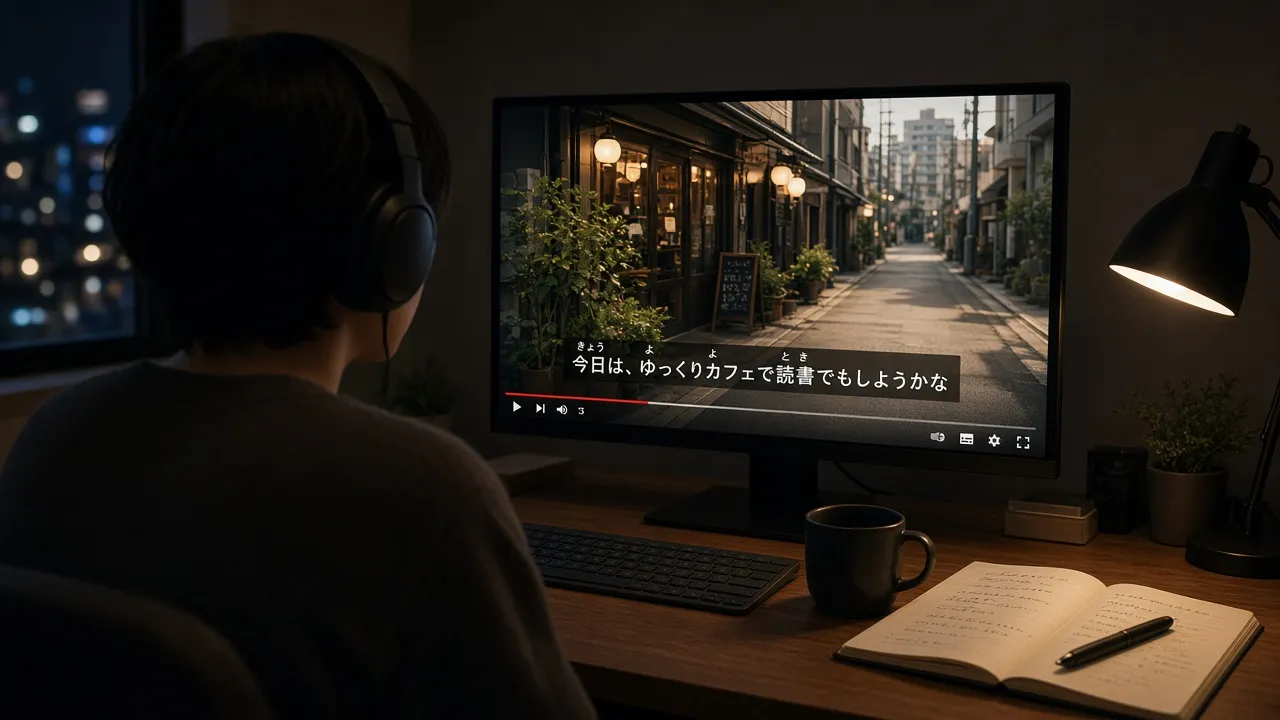
Short answer: Japanese kanji are notoriously hard to read for beginners and intermediate learners, even when they already know hiragana and katakana. In Japanese textbooks and children’s literature, small kana characters printed above kanji to indicate pronunciation are called furigana (ふりがな). Most “furigana Chrome extensions” in the web store are designed exclusively for static web text like news articles and Wikipedia—they do not work on YouTube or Netflix video subtitles. When learning Japanese from video, you need a dedicated tool that renders readings directly on the current subtitle line inside the video player and lets you click any word for instant dictionary definitions and grammar breakdowns.
Disclosure: This guide is written by the LingTube team. LingTube displays furigana directly on Japanese subtitles in study mode on YouTube and Netflix. Information regarding third-party extensions mentioned below was verified in October 2026.
What furigana actually is
In written Japanese, kanji convey meaning, while kana (hiragana and katakana) represent phonetic sounds. Language learners often recognize spoken words by ear long before they can read the corresponding kanji combinations.
To bridge this gap, Japanese publications, graded readers, and manga print tiny kana readings above difficult characters. This pronunciation guide is known as 「ふりがな (furigana)」 or ruby text.
Furigana is not a third alphabet or a separate script—it simply uses the standard hiragana and katakana you already know to reveal the exact reading of unfamiliar kanji.
Why search results only show webpage tools
Searching for “furigana chrome extension” returns dozens of browser extensions like Furiganator, Auto Furigana, or popup readers like Yomitan and Yomichan. These extensions inspect HTML paragraph elements on a webpage and inject phonetic annotations. They work wonderfully for reading NHK NEWS WEB EASY or Japanese Wikipedia articles.
However, video subtitles on YouTube are not standard webpage text. They are rendered as dynamic visual overlays synced to audio timestamps within the video player. Traditional DOM injection extensions cannot detect these fleeting subtitle lines, or they conflict with the player controls. Netflix operates similarly: subtitle cues are delivered via dedicated timed-text tracks rather than regular HTML blocks.
If your learning obstacle is “I cannot read kanji quickly enough at native speaking speed while watching anime, drama, or vlogs,” generic webpage extensions will not help with the subtitles you are hearing.
For a comprehensive approach to media-based immersion, see our guide on how to learn Japanese with anime. This article focuses specifically on subtitle pronunciation aids.
Webpage reading tools vs. in-player subtitle study tools
| Learning & Study Needs | Standard Webpage Furigana Extension | In-Player Video Study Tool (LingTube) |
|---|---|---|
| Add kana readings to blog & news article kanji | Supported | Secondary feature (optimized for video) |
| Add furigana to YouTube / Netflix live subtitles | Not supported (cannot track dynamic captions) | Fully supported (rendered natively on player) |
| Click words for contextual, full-sentence translation | Rarely available | Fully supported (analyzes complete subtitle context) |
| Clearly distinguish whether は, が, を is a particle | Must check manually in popup | Directly tagged on the subtitle line with part of speech |
| Handle fragmented / chopped-up auto captions | Cannot handle | Smart sentence merge and AI re-transcription |
Furigana solves the question: “How is this character pronounced?” But pronunciation alone does not explain grammar. For example, seeing 「は」 above 「は」 does not tell you whether it is the topical particle or the noun for “tooth” (歯). A lookup tool must process the entire sentence to provide accurate definitions. For details on why single-word lookups often fail, check out why looking up single words in subtitles often fails.
How to enable furigana on YouTube and Netflix subtitles
Here is how to set up furigana using LingTube on desktop Google Chrome:
- Install the LingTube Chrome extension from the Chrome Web Store.
- Open the extension options, set your learning language to Japanese, and select your native language (English, Simplified/Traditional Chinese, Korean, French, German, Spanish, Portuguese, Vietnamese, or Indonesian).
- Open any YouTube video or Netflix title with Japanese subtitles (we strongly recommend using authentic Japanese captions rather than translated dialogue).
- Enter Study Mode and toggle Furigana on. Clean kana readings will appear immediately above each kanji character on the active subtitle line.
- Click on any unfamiliar word to inspect its definition, pitch accent, and grammatical breakdown. For idioms or phrasal expressions, drag to select the entire phrase.
- If YouTube’s auto captions cut off sentences awkwardly mid-speech, enable Smart Sentence Merge to reconstruct coherent sentences, or generate an AI transcript.
LingTube provides dual subtitles, instant word lookup, and shadowing practice for free. Furigana display, part-of-speech tagging, and advanced grammar breakdowns are premium features (new accounts receive a 3-day free trial).
LingTube is designed for desktop Chrome browsers and does not run inside mobile apps or TV operating systems. Use webpage readers for articles and dedicated player extensions for streaming video.
On Netflix, LingTube reads Netflix’s authentic Japanese subtitle tracks. If a title lacks Japanese captions in your region, try changing your profile display language or switching titles (see dual subtitles on Netflix for setup steps). On YouTube, if an authentic Japanese track is missing, AI speech-to-text can generate a Japanese caption track from the audio track, allowing furigana to be overlaid seamlessly.
A 20-minute daily listening and reading routine
- Active Listening with Furigana (8 minutes): Play Japanese audio with Japanese subtitles and furigana enabled. Read along silently. Hide your native language translation to force kanji-sound association. As your reading speed improves, use the comprehensible input listening mask to obscure the text and test pure listening comprehension.
- Grammar & Particle Breakdown (4 minutes): When you encounter an unfamiliar particle usage, verb conjugation, or set expression, click to review its grammatical function and save key patterns to your word bank.
- In-Player AI Clarification (3 minutes): If a nuanced line, honorific register, or cultural reference remains unclear, use the in-player AI Video Assistant to ask about that specific subtitle line.
- Targeted Shadowing (5 minutes): Select 2 or 3 natural dialogue lines and practice shadowing technique. Furigana eliminates reading hesitation, while shadowing builds speech muscle memory and natural intonation.
If you still find it difficult to keep up with furigana turned on, the video material may exceed your current proficiency level. Furigana removes character reading obstacles, but selecting comprehensible content suited to your level is still essential for effective language acquisition.
Frequently Asked Questions (FAQ)
What is the best furigana Chrome extension for Japanese learners?
For static web pages, news articles, and blogs, dedicated DOM injection tools or Yomitan are great options. For streaming video on YouTube and Netflix, you need a specialized video study extension like LingTube that renders readings natively on timed subtitle tracks and provides contextual grammar analysis.
Can I turn on furigana using YouTube’s built-in settings?
No, YouTube does not have a native furigana setting. Study extensions achieve this by analyzing subtitle data locally in your browser and overlaying readings directly onto the player in real time.
Does Language Reactor have furigana for Japanese subtitles?
Language Reactor provides dual subtitles and dictionary hover lookups. However, for clear on-subtitle kana positioning, detailed part-of-speech tagging, and sentence-level grammatical analysis, LingTube offers more specialized features tailored specifically for Japanese learners (see our Language Reactor vs Trancy vs LingTube comparison).
Can I use furigana while watching anime?
Yes, provided the anime has authentic Japanese subtitles on Netflix or verified captions on YouTube. Keep in mind that anime frequently incorporates character speech quirks, regional dialects, and informal contractions; combining furigana with sentence-level grammar lookups ensures you grasp both reading and intent (see learning Japanese with anime).
Can I become fluent in Japanese using only furigana on YouTube?
Furigana is a powerful reading accelerator that prevents unfamiliar kanji from interrupting your listening flow. However, achieving fluency still requires solid foundational grammar study, consuming comprehensible input, and actively practicing listening and speaking.