


Language Reactor vs Trancy vs LingTube: Best Language Learning Extension in 2026
An honest 2026 comparison of Language Reactor, Trancy and LingTube — features, AI translation accuracy, supported platforms and pricing — to help you pick the right Chrome extension.
8 min read
Watching YouTube and Netflix is one of the most enjoyable ways to learn a language — as long as you have the right browser extension. In this guide we compare three popular options side by side: Language Reactor, the long-standing favorite; Trancy, the feature-packed all-rounder; and LingTube, the newest tool, built around AI.
Disclosure: This article is written by the LingTube team. We’ve tried to be fair, include each tool’s strengths and weaknesses, and base the comparison on publicly available information as of September 2026.
The short answer
- Choose Language Reactor if you want a proven, free-to-start tool and also read books or listen to podcasts in your target language.
- Choose Trancy if you want a “Swiss Army knife”: more video platforms, more languages (including Portuguese as a study language, plus many others), AI pronunciation scoring, or the option to use your own AI API key.
- Choose LingTube if you mainly learn from YouTube and Netflix and want AI translations that use the whole sentence, plus grammar analysis, AI summaries, and timestamped notes.
Quick comparison
| Language Reactor | Trancy | LingTube | |
|---|---|---|---|
| Best for | Classic dual-subtitle learning | All-in-one learning toolkit | AI-powered video learning |
| Video platforms | YouTube, Netflix | YouTube, Netflix, HBO, Disney+, Coursera, Udemy, TED and more | YouTube (incl. Shorts), Netflix |
| Books & podcasts | Yes | Yes (plus PDF translation) | No |
| Word translation | Tap a word | Tap a word | Tap a word, or drag to select any phrase |
| Translation engine for words | Machine translation | AI models | LLM with full-sentence context |
| AI extras | — | AI conversation practice, pronunciation scoring | Grammar analysis, summaries & outlines, AI Q&A, simultaneous interpretation, AI transcription |
| Social features | — | — | Danmaku (live comments), public timeline notes |
| Paid plans from | $5.95/month | About $3.49/month (varies by region) | $5.99/month |
Language Reactor: the veteran
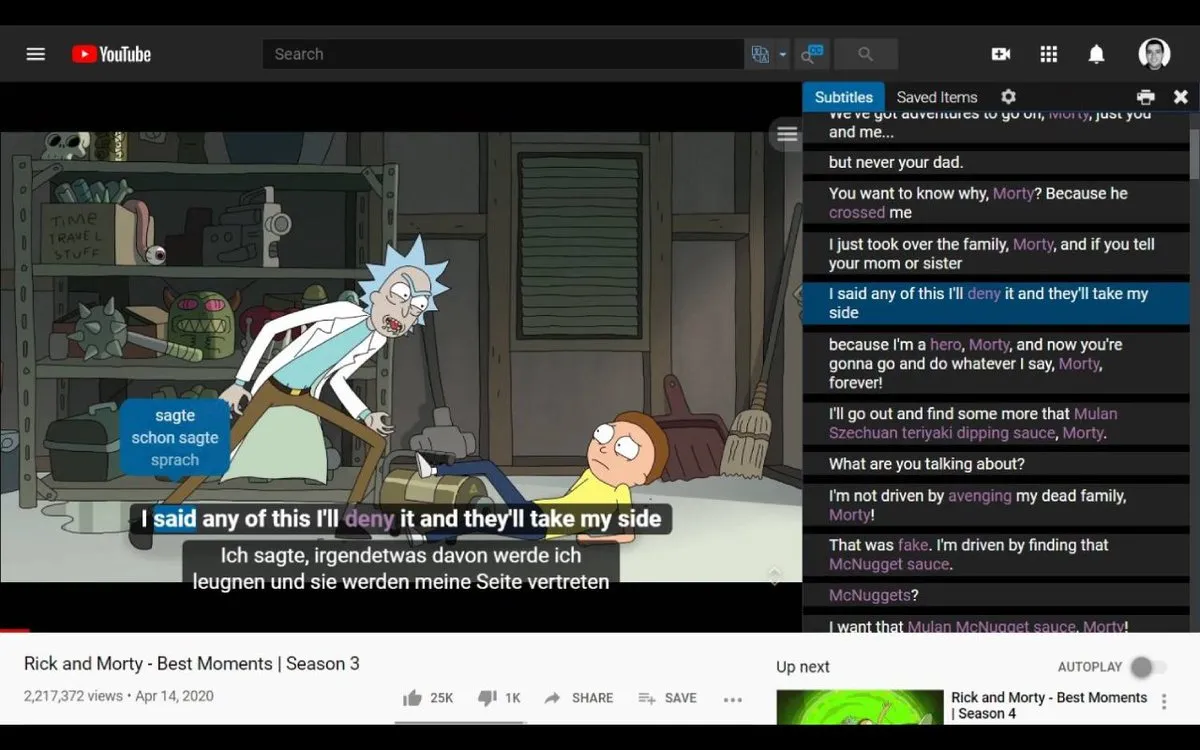
Language Reactor is the longest-running extension of the three and has by far the largest user base. It made its name by turning YouTube and Netflix into learning material: dual subtitles, a clickable transcript, and one-click word lookups. It also covers books and podcasts, so you can keep learning when you’re not watching videos.
Strengths
- Mature, stable, and widely recommended by language learners
- Dual subtitles and a synchronized transcript panel
- Supports books and podcasts in addition to video
Weaknesses
- The interface feels dated compared to newer tools
- Saving words and phrases requires the Pro plan
- Single-word lookups rely on traditional machine translation (more on why that matters below)
Trancy: the all-rounder
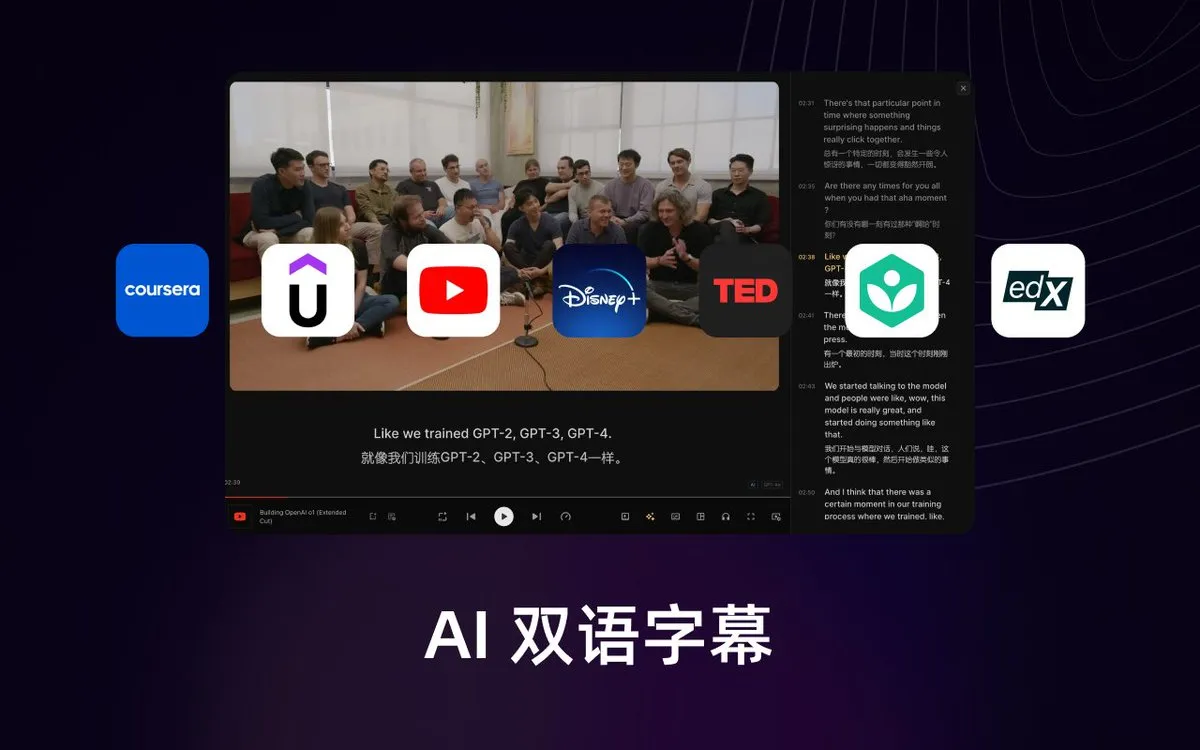
Trancy has a more modern design and a smoother overall experience. It offers several learning modes — including a movie mode and a reading mode — and supports far more platforms than the other two. Its most distinctive features are AI conversation practice and AI scoring after shadowing: if you want feedback on your pronunciation, Trancy is one of the few extensions that offers it.
Like Language Reactor, Trancy supports books and podcasts, and you can even translate PDFs on its website. Its pricing also suits heavy users: you can plug in your own AI API key and keep learning without usage caps.
Strengths
- Modern interface and many learning modes
- The widest platform and language coverage of the three
- Pronunciation scoring and AI conversation practice
- Bring-your-own API key for unlimited use
Weaknesses
- With so many features, it can take a while to learn where everything is
- Prices vary by region, so it’s harder to compare plans at a glance
LingTube: the newcomer built around AI
LingTube launched in September 2026, making it the newest tool here. Instead of adding AI on top of a traditional extension, it was built around large language models from day one.
Context-aware AI translation
You can tap any word to translate it, or drag across a phrase of any length to get a translation of exactly that selection. Behind the scenes, LingTube uses a large language model that reads the whole sentence, so it can pick the right meaning of a word with multiple senses.
This matters more than it sounds. Many extensions translate single words with Google or Microsoft machine translation because it’s extremely cheap. But those engines are designed for full sentences. Given a single word with no context, they often guess wrong.
Here is a real example. In Japanese, the particle は marks the topic of a sentence — it’s usually left untranslated or rendered as “is”. Yet Google Translate returns “teeth” (歯, which is also pronounced ha):
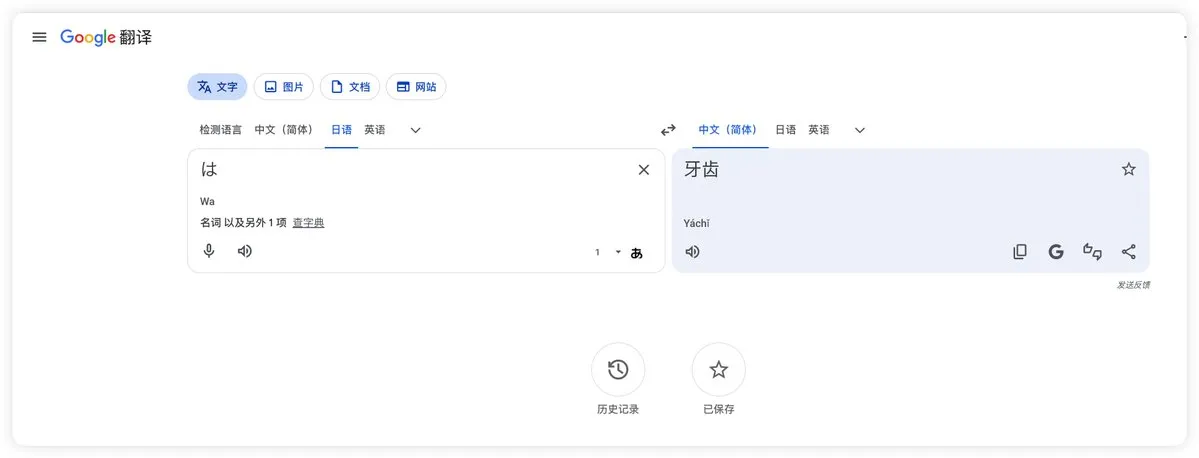
A word-by-word engine can’t tell the difference. An LLM that sees the full sentence can. The same goes for phrases: select getting excited about and LingTube explains the phrase, translates the full sentence, and tells you how the phrase is built:
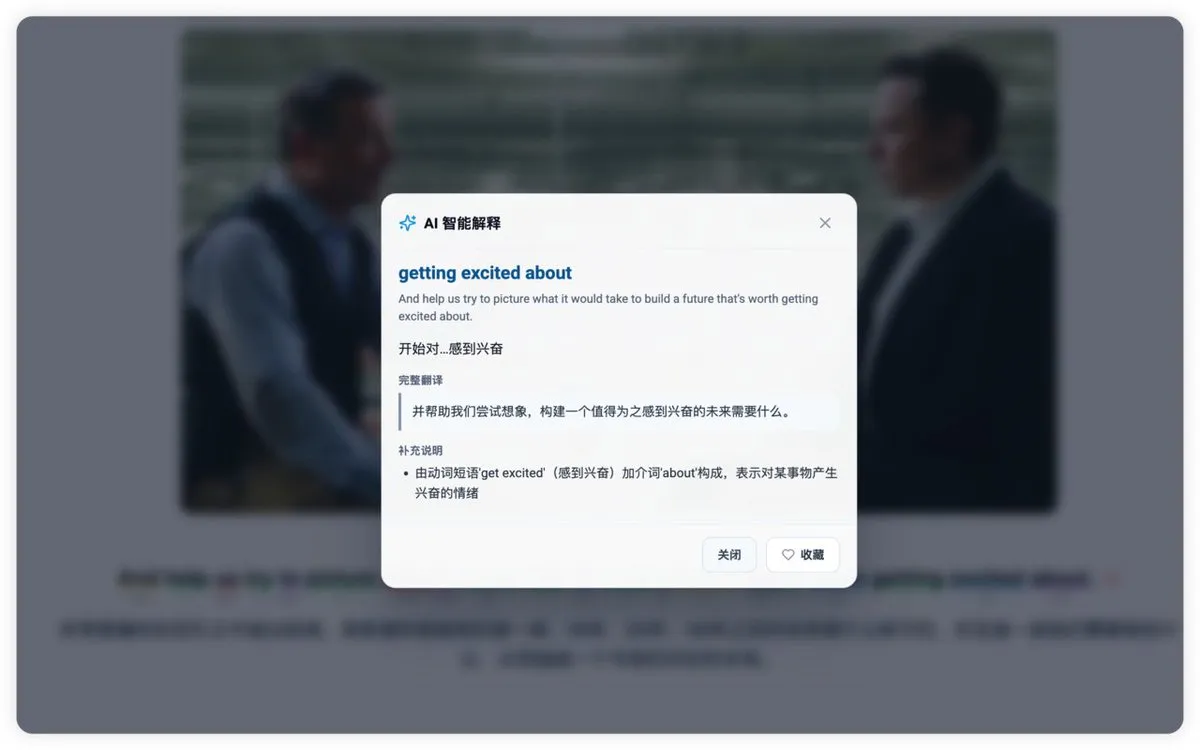
LingTube also labels each word’s part of speech as the subtitle plays, so you can see at a glance which words are nouns, verbs, or particles. Eight learning languages are supported: English, Japanese, Korean, French, German, Spanish, Italian, and Simplified Chinese.
Cleaner subtitles: sentence merging and AI transcription
YouTube’s auto-generated subtitles are often chopped into fragments. LingTube’s smart sentence merging stitches these fragments back into complete sentences, which makes them much easier to read and translate.
When a video’s subtitles are poor, badly translated or missing altogether, you can have LingTube transcribe the audio with AI speech recognition and translate the result. This usually produces more accurate and natural bilingual subtitles than merging alone.
Grammar analysis
With one click, LingTube analyzes the grammar of the current sentence, pulls out set phrases and slang, and lets you save them to your review list.
Summaries, outlines and simultaneous interpretation
On YouTube, LingTube can generate a video summary and a structured outline — with clickable timestamps — without copying the link into another tool. It also offers AI simultaneous interpretation, reading a translation aloud as the video plays.
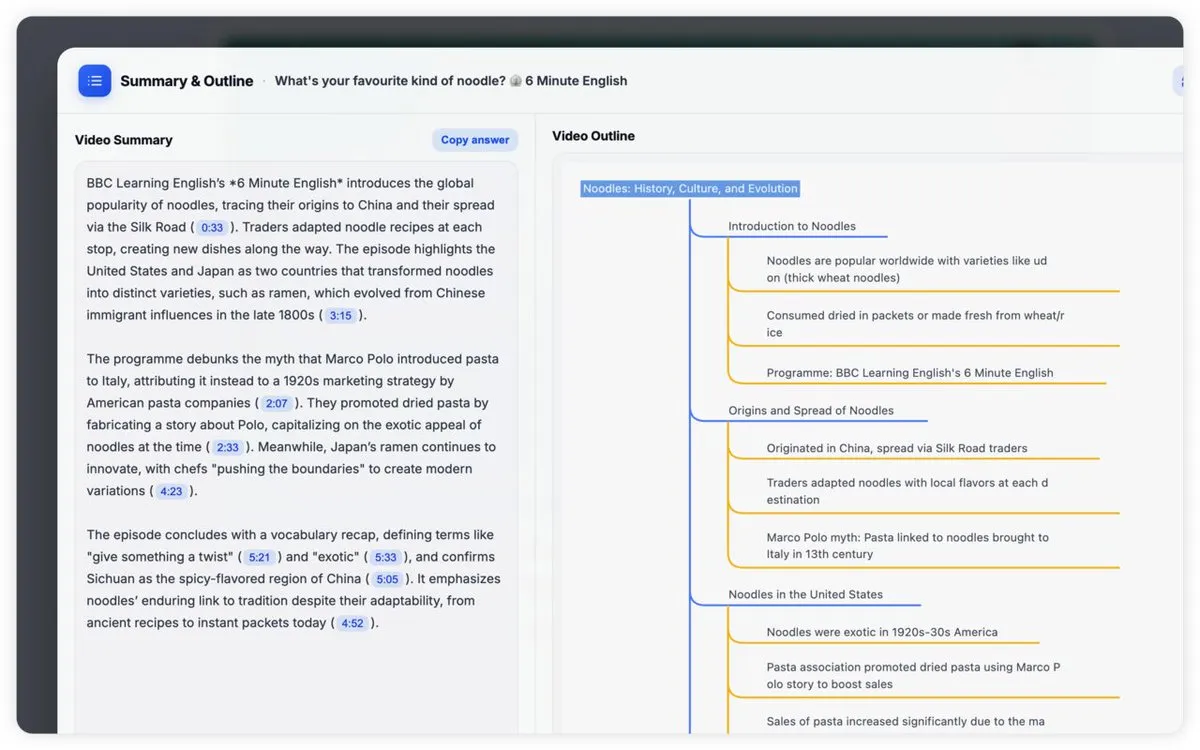
A more social, more engaging experience
- Danmaku: live, on-screen comments let you chat with other learners watching the same YouTube or Netflix video (see the cover image above).
- YouTube Shorts support: study mode works on vertical short videos too.
- Better progress bar: YouTube chapter titles, thumbnail previews and the “most replayed” heatmap appear when you hover over the progress bar.
- Shadowing for everyone: the shadowing tool is free, even without a subscription.

Timeline notes
LingTube’s timeline notes let you save a thought at any moment of a video, written in Markdown. Keep notes private or share them publicly — public notes appear as small avatars on the progress bar for other viewers. When you review, one click takes you back to the exact clip where you wrote the note.

Strengths
- The most accurate word and phrase translations of the three, thanks to full-sentence LLM context
- Deep learning tools: grammar analysis, summaries, outlines, AI Q&A and notes
- Engaging social features such as danmaku and public notes
Weaknesses
- The newest and least established of the three
- Focused on YouTube and Netflix only — no books, podcasts or other platforms
- Because AI is expensive to run, the free plan doesn’t include AI features
- Transcription, AI Q&A and summaries are currently available on YouTube only
Pricing comparison
| Free plan | Monthly | Yearly | |
|---|---|---|---|
| Language Reactor | Yes | Pro $5.95 | Pro $39.95 |
| Trancy | Yes | Premium from about $3.49, Premium + Advanced AI about $8.79 | Discounted |
| LingTube | Yes (plus 3 days of Premium on sign-up) | Plus $5.99 / Premium $9.99 | 20% off: $57.50 / $95.90 |
Prices are in USD, as listed in September 2026. Trancy’s prices vary by region, and LingTube’s prices exclude tax. Always check the official pricing pages for the latest offers.
Which one should you choose?
If you want a free option with books and podcasts, go with Language Reactor or Trancy. Both let you tap words for a translation, though Language Reactor’s free plan doesn’t let you save words. LingTube’s free plan is more limited because its AI features cost more to run.
If you want a “Swiss Army knife” for language learning — support for study languages LingTube does not cover, such as Portuguese, or content from HBO, Coursera and other platforms beyond YouTube and Netflix — Trancy is your best choice.
If you want AI translations that use the whole sentence, plus grammar help and a more engaging way to watch, try LingTube. Every new account automatically gets 3 days of Premium, no credit card required.
Each of these extensions serves a different kind of learner. The best one is simply the one that matches how you like to learn.
FAQ
Is there a free alternative to Language Reactor Pro?
Yes. Trancy and LingTube both have free plans. Trancy’s free plan includes click-to-translate, and LingTube’s free plan includes bilingual subtitles, danmaku, shadowing and YouTube Shorts support, plus a 3-day Premium trial with all AI features.
Which extension gives the most accurate single-word translations?
Tools that translate words with a large language model and the surrounding sentence — like LingTube — handle words with multiple meanings far better than tools that send isolated words to traditional machine translation engines.
Do these extensions work on Netflix?
All three work on Netflix. On LingTube, bilingual subtitles, word translation, grammar analysis, danmaku and notes work on Netflix, while transcription, AI Q&A and summaries are currently available on YouTube only.