


How to Get Dual Subtitles on YouTube and Netflix (2026 Guide)
Show two subtitles at once on YouTube and Netflix: what works without an extension, the best dual subtitle extensions compared, and fixes when subtitles won't appear.
8 min read

Short answer: neither YouTube nor Netflix can show two subtitle languages at the same time. On a desktop browser, a dual subtitle extension adds a second line — usually your native language under the original — in about two minutes. On phones and smart TVs, browser extensions don’t run inside the official apps, so you need a separate mobile app or have to stick with one subtitle language.
This guide covers what each platform can do on its own, how to set up dual subtitles step by step, how the main extensions compare, and how to fix the problems people run into most.
Disclosure: this guide is written by the LingTube team, and LingTube is one of the extensions compared below. Competitor details were checked on each product’s own website in October 2026.
What YouTube and Netflix can do without an extension
Before installing anything, it helps to know what the platforms already offer, because the extension builds on these captions.
YouTube: one language, plus auto-translate
YouTube shows one subtitle language at a time. On desktop, click the gear icon → Subtitles/CC to choose a language. If you pick Auto-translate, YouTube machine-translates the existing subtitles into almost any language.
That gives you a translation, but you lose the original line — not ideal when the whole point is to read the language you’re learning. Many videos also only have auto-generated subtitles, which YouTube’s speech recognition produces. They are often split mid-sentence and have little or no punctuation, which makes both reading and translation harder (more on that below).
Netflix: one language, but a useful new option
Netflix also shows one subtitle language at a time. Two details matter for learners:
- Available languages depend on your settings. Netflix doesn’t list every subtitle language it has for a title. It shows a selection based on your region and your profile language. If the language you want is missing, try changing the profile language under Manage Profiles → Language and reopen the title.
- Dialogue-only original subtitles. In April 2025, Netflix introduced original-language subtitles that show only the spoken dialogue, as an alternative to SDH/CC subtitles that also include sound cues like [door slams] and speaker names. It started with new titles and Netflix originals. For learners, the dialogue-only option is cleaner to read and to translate.
So the best you can do natively is the target language or your native language. To see both, you need an extension.
How to get dual subtitles on YouTube (step by step)
These steps use LingTube, but the flow is similar for most extensions.
- Install the extension from the Chrome Web Store and pin it to your toolbar.
- Set your languages: the language you’re learning (English, Japanese, Korean, French, German, Spanish, Italian or Simplified Chinese) and your native language.
- Open any YouTube video with subtitles and enter study mode. The original subtitle and a translation line appear together.
- Tap any word for a translation, or drag across a phrase to translate exactly that selection.
- Use the keyboard to replay the current line or jump between lines, so you can loop the sentence you didn’t catch.
Dual subtitles in LingTube’s free plan work on regular videos and on YouTube Shorts:

When YouTube’s auto-generated subtitles are a mess
Auto-generated subtitles are cut by timing, not by meaning. A sentence like “I was going to tell you / about the thing that happened / yesterday at work” arrives in three fragments, and each fragment gets translated on its own. The translation of “about the thing that happened” means very little without the rest of the sentence.
Two features fix this in LingTube’s paid plans:
- Smart sentence merging stitches the fragments back into complete sentences before they’re shown and translated.
- AI transcription transcribes the audio again with speech recognition when the subtitles are bad or missing altogether, then translates the result. This is the most reliable option for videos with no subtitles at all.
How to get dual subtitles on Netflix (step by step)
- Install the extension and use Chrome on a computer. The Netflix mobile and TV apps can’t run browser extensions.
- Open a title and check the audio and subtitle menu. The original language should be available as subtitles. Prefer the dialogue-only option over CC/SDH when Netflix offers both.
- Enter study mode. The original-language subtitles and your native-language subtitles appear together.
A point worth knowing, because it affects quality: LingTube builds Netflix dual subtitles from Netflix’s own subtitle files, not from machine translation. If a title has no subtitle file in your native language, LingTube shows the target-language subtitles on their own rather than filling the gap with a machine-translated line. Other extensions handle this differently. Some translate the missing language automatically, which is convenient but can introduce errors into what looks like an official subtitle.
Why single-word translation quality matters more than it seems
Every dual subtitle extension lets you tap a word. What happens next varies a lot.
Many extensions send the tapped word, on its own, to a machine translation engine such as Google Translate, Microsoft Translator or DeepL. Those engines are built for full sentences. Given one word without context, they guess. Here is Google Translate with the Japanese particle は, which marks the topic of a sentence:
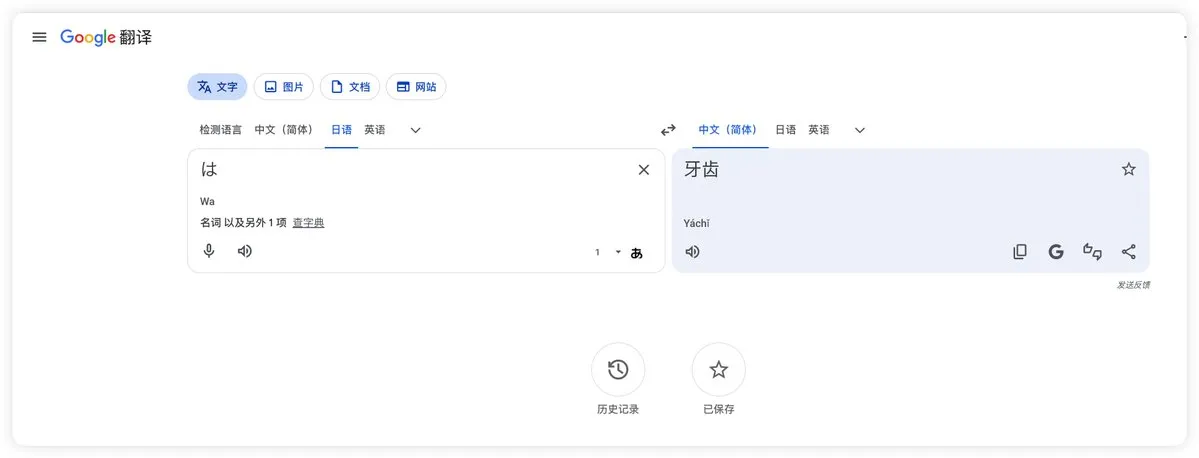
It returns “teeth”, because 歯 (tooth) is also pronounced ha. LingTube sends the word together with the full subtitle sentence to a large language model, so it can tell a particle from a noun, or book as in “book a table” from book as in a novel.
Dual subtitle extensions compared (October 2026)
| Platforms | Free plan | Mobile app | Paid plans from | |
|---|---|---|---|---|
| LingTube | YouTube (incl. Shorts), Netflix | Dual subtitles, danmaku, shadowing | No (desktop Chrome) | $5.99/month |
| Language Reactor | YouTube, Netflix | Dual subtitles; saving words and Anki export are Pro | No | $5.95/month |
| Trancy | YouTube, Netflix, Disney+, HBO, Coursera, Udemy, TED and more | Dual subtitles, word lookup | iOS, Android | About $3.49/month (varies by region) |
| InterSub | YouTube, Netflix, Prime Video, HBO, Crunchyroll, TED, Coursera, Udemy, LinkedIn Learning | Free trial | No (phone remote control) | Pay-as-you-go or subscription |
| Linglass | YouTube, Netflix, HBO Max, Crunchyroll, iQIYI, Viki | Limited daily translations | iOS, Android | $7.99/month ($59.99/year) |
| Funlingo | Netflix, YouTube, Prime Video, Disney+ Hotstar, Apple TV, Crunchyroll, Udemy, Coursera | Dual subtitles | No | — |
Prices are in USD as listed on each product’s website in October 2026 and may vary by region and tax.
How to read the table:
- You watch on many streaming or course platforms: Trancy, InterSub or Funlingo cover the most sites.
- You mainly study on your phone: Trancy and Linglass have mobile apps. LingTube, Language Reactor and InterSub are desktop-only.
- You mostly learn from YouTube and Netflix and care about understanding every line: LingTube focuses on translation accuracy (full-sentence context for words and phrases), cleaner YouTube subtitles (sentence merging and AI transcription) and study tools such as grammar analysis, summaries and timestamped notes.
For a deeper head-to-head of the two best-known options, see Language Reactor vs Trancy vs LingTube, or the broader Language Reactor alternatives roundup.
Dual subtitles not showing? A troubleshooting checklist
- The video has no subtitles. Dual subtitles need at least one caption file. On YouTube, check the CC button. If it’s greyed out, use AI transcription or pick another video.
- Your native language is missing on Netflix. Change the profile language as described above, or accept target-language-only subtitles for that title.
- Two extensions are fighting. Running two subtitle extensions at once often breaks both. Disable the others and reload the page.
- “Too many subtitle requests” on YouTube. This usually comes from a VPN or shared IP address that YouTube is rate-limiting. Switching networks or turning off the VPN typically fixes it.
- You’re on a phone or TV. Extensions only run in desktop browsers. Cast from a computer or use a mobile app that supports dual subtitles.
How to learn with dual subtitles (without just reading your native language)
Dual subtitles have a known trap: your eyes drift to the line you understand without effort, and you end up reading a translation instead of learning. A few habits keep the target language in charge:
- Read the target line first, then glance at the translation only for the parts you didn’t get.
- Replay the line you missed instead of letting it go by. Looping one sentence three times beats watching ten more minutes passively.
- Hide the subtitles once a video gets easier. LingTube’s listening mask covers the subtitles so you listen first and only reveal the text when you need it.
- Choose videos you mostly understand. Language acquisition works best when input is slightly above your level. That idea is called comprehensible input.
- Say the line out loud. Repeating along with the speaker, a technique called shadowing, turns what you read into something you can say. LingTube’s shadowing tool is free.
FAQ
Can you have two subtitles on YouTube at the same time?
Not natively. YouTube shows one subtitle language at a time, including when you use Auto-translate. To see the original and a translation together, use a dual subtitle extension in a desktop browser.
Does Netflix have dual subtitles?
No. Netflix displays one subtitle language at a time. Since April 2025 it does offer dialogue-only original-language subtitles on new titles, which are better for learners than CC/SDH, but showing two languages at once still requires an extension.
What is the best free dual subtitle extension?
It depends on where you watch. Language Reactor and Trancy both offer free dual subtitles on YouTube and Netflix, and Trancy covers more platforms. LingTube’s free plan includes dual subtitles on YouTube (including Shorts) and Netflix, plus danmaku and shadowing. Its AI translation features are paid, with 3 days of Premium for new accounts.
Do dual subtitles work on the Netflix or YouTube mobile app?
No. Browser extensions can’t run inside the official mobile or TV apps. Some tools, such as Trancy and Linglass, offer their own mobile apps instead.
Why does my dual subtitle extension translate words wrong?
Most likely it sends single words without their sentence to a machine translation engine. Words with several meanings, and grammar words like particles, are where this fails most. Extensions that translate words in the context of the full sentence get these right far more often.