


7 Best Language Reactor Alternatives in 2026 (Free & Paid)
Language Reactor alternatives compared: LingTube, Trancy, Migaku, InterSub, Linglass, Funlingo and Immersive Translate. Platforms, free plans, mobile apps and pricing.
7 min read

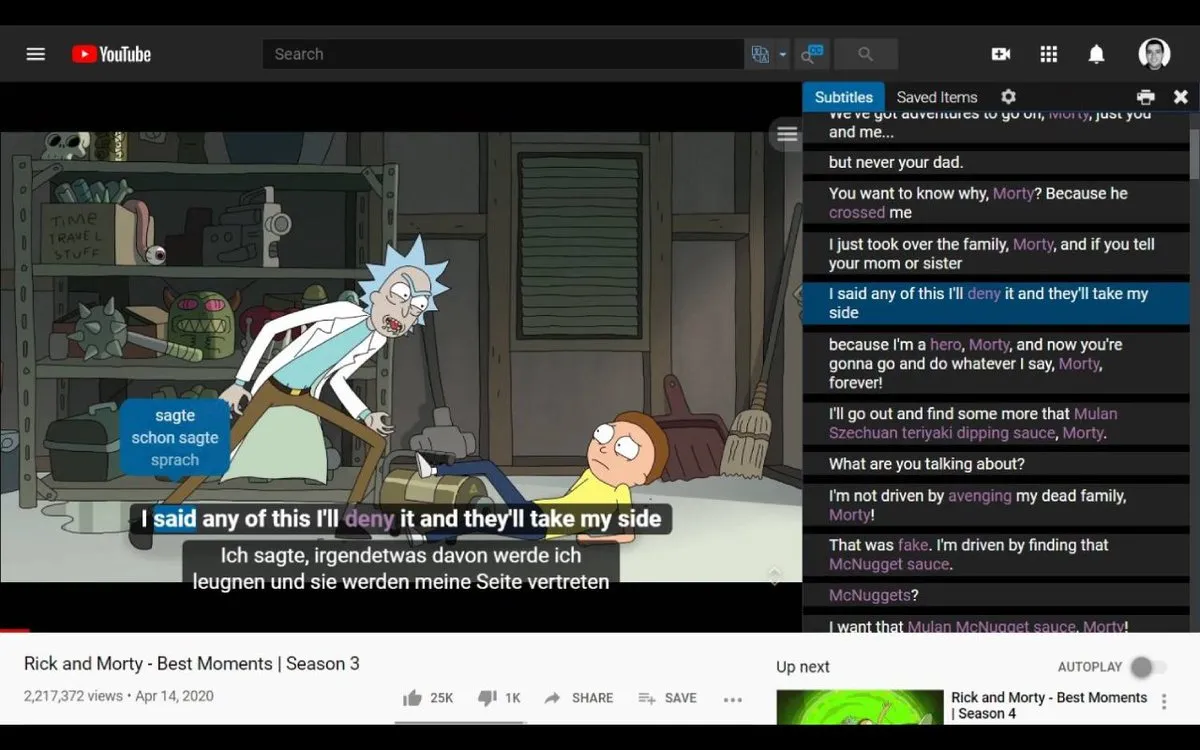
Language Reactor defined the “learn languages with Netflix and YouTube” category, and it’s still a solid, free way to get dual subtitles. But learners keep looking elsewhere for the same few reasons: there’s no mobile app, the free plan doesn’t let you save words, and single-word lookups rely on traditional machine translation.
Here are seven alternatives, what each does best, and where each falls short.
Disclosure: we make LingTube, one of the tools below. We’ve tried to be fair, and we list our own weaknesses too. Every product’s details were checked on its own website in October 2026. Prices are in USD and may vary by region and tax.
Quick comparison
| Tool | Best for | Platforms | Mobile app | Free plan | Paid from |
|---|---|---|---|---|---|
| LingTube | Accurate AI translation and study tools on YouTube and Netflix | YouTube (incl. Shorts), Netflix | No | Yes | $5.99/mo |
| Trancy | The most platforms and features in one tool | YouTube, Netflix, Disney+, HBO, Coursera, Udemy, TED and more | iOS, Android | Yes | ~$3.49/mo |
| Migaku | Serious Japanese, Korean and Chinese learners who love flashcards | YouTube, Netflix and more | iOS, Android | No | ~$10/mo |
| InterSub | Course platforms like Coursera, Udemy and LinkedIn Learning | YouTube, Netflix, Prime Video, HBO, Crunchyroll, TED, Coursera, Udemy and more | No | Trial | Pay-as-you-go |
| Linglass | A built-in review loop on mobile and desktop | YouTube, Netflix, HBO Max, Crunchyroll, iQIYI, Viki | iOS, Android | Yes | $7.99/mo |
| Funlingo | Free dual subtitles on many streaming services | Netflix, YouTube, Prime Video, Disney+ Hotstar, Apple TV, Crunchyroll and more | No | Yes | — |
| Immersive Translate | Translating web pages and PDFs, not learning | YouTube, Netflix and most websites | iOS, Android | Limited | Varies |
For reference, Language Reactor works on YouTube and Netflix (plus books and podcasts), has no mobile app, and its Pro plan costs $5.95/month or $39.95/year. Saving words and Anki export are Pro features.
Why learners look for a Language Reactor alternative
- No phone or tablet app. It’s a desktop browser extension only, so the habit stops when you leave your laptop.
- The free plan doesn’t save words. You can look words up, but building a vocabulary list needs Pro.
- Word translations can be wrong. Single words are machine-translated without their sentence, which goes wrong for words with several meanings and for grammar words.
- The interface feels dated next to newer tools.
None of these are problems for everyone. If you study at a desk, mainly use YouTube and Netflix, and like the classic interface, Language Reactor remains a good choice.
1. LingTube: best for translation that uses the whole sentence
LingTube is the newest tool here, launched in September 2026 and built around large language models.
What it does well
- Translation in context. Tap a word or drag across any phrase. The selection is translated together with its full sentence, so book in “book a table” comes back as “reserve”, and the Japanese particle は isn’t mistaken for 歯 (tooth).
- Cleaner YouTube subtitles. Smart sentence merging repairs auto-generated subtitles that are chopped mid-sentence, and AI transcription creates new subtitles when they’re bad or missing.
- Study tools beyond subtitles. Grammar analysis, video summaries and outlines, AI Q&A about the video, simultaneous interpretation, CEFR levels (A1–C2) on words, furigana for Japanese, timestamped Markdown notes, and Anki export on Premium.
- Social learning. Danmaku (live on-screen comments) and public timeline notes from other learners.
- A free plan that isn’t a demo. Dual subtitles, YouTube Shorts support, danmaku and shadowing practice are free. New accounts get 3 days of Premium.
Where it falls short
- YouTube and Netflix only, with no books, podcasts or other streaming sites.
- No mobile app yet, desktop Chrome only.
- AI features are paid, because large language models cost more to run than machine translation.
- Eight learning languages (English, Japanese, Korean, French, German, Spanish, Italian, and Simplified Chinese). Learners of Portuguese or other languages not on that list should look at Trancy or InterSub.
- Transcription, AI Q&A and summaries currently work on YouTube only.
Pricing: Free, Plus $5.99/month, Premium $9.99/month, 20% off yearly.
2. Trancy: best all-rounder
Trancy covers the most ground: many video platforms, web page and PDF translation, mobile apps, and an AI speaking coach that scores your pronunciation when you shadow.
- Pros: broadest platform coverage; iOS and Android apps; pronunciation scoring and AI conversation practice; option to use your own AI API key; low entry price.
- Cons: so many features that it takes time to learn where everything is; prices vary by region; single-word lookups use machine translation engines (you can choose which).
Read our full Language Reactor vs Trancy vs LingTube comparison for a closer look.
3. Migaku: best for serious Asian-language learners
Migaku is aimed at dedicated immersion learners, especially in Japanese, Korean and Chinese. Its strength is turning what you watch into rich flashcards with audio, screenshots and the original sentence, with Anki-style depth.
- Pros: excellent flashcard workflow; strong Japanese support (readings, word frequency, pitch information); mobile apps.
- Cons: no free plan; one of the more expensive options; the extension, desktop and mobile apps split the workflow, which new users often find confusing; European languages get less attention.
Short Migaku review: if you already know you want an Anki-centered immersion workflow for Japanese, Migaku is worth paying for. If you mostly want to understand videos better, a cheaper dual subtitle tool will feel simpler.
4. InterSub: best for course platforms
InterSub’s standout is coverage of education platforms that others ignore, including Coursera, Udemy, LinkedIn Learning and TED, plus mainstream streaming sites. It supports over 30 languages and runs on Chrome, Edge and Firefox.
- Pros: wide platform list; hover-to-translate with phrase and idiom detection; “show subtitles only on pause” mode for listening practice; your phone can act as a remote control for word lookups.
- Cons: no real mobile app; pay-as-you-go lookups can be harder to predict than a flat subscription.
5. Linglass: best for a built-in review loop
Linglass focuses on YouTube and Netflix, plus HBO Max, Crunchyroll, iQIYI and Viki, with a review system built in.
- Pros: free audio pronunciation and phonetic spelling for clicked words; unlimited saved words on the free plan; built-in spaced repetition (FSRS); iOS and Android apps.
- Cons: the free plan has a small daily translation limit; no Anki export; fewer platforms than Trancy or InterSub; Premium is $7.99/month, or $59.99 billed yearly.
6. Funlingo: best free option for many streaming services
Funlingo is a free dual subtitle extension that covers a long list of streaming services, including Prime Video, Disney+ Hotstar, Apple TV and Crunchyroll, plus Udemy and Coursera.
- Pros: free dual subtitles on more streaming services than most; simple setup.
- Cons: lighter on study tools than the learning-focused options above; no mobile app.
7. Immersive Translate: best for reading, not learning
Immersive Translate often appears in these lists, but it’s a translation tool first: it translates web pages, PDFs and ebooks side by side and can also add bilingual subtitles to videos.
- Pros: excellent for reading foreign websites and documents; many AI engines to choose from.
- Cons: no real learning loop, such as saving words, grammar help or review. Use it to understand content, not to learn the language.
How to choose
- You learn mostly from YouTube and Netflix and want to understand every line correctly: LingTube.
- You watch on many platforms or want pronunciation scoring: Trancy.
- You’re committed to Japanese, Korean or Chinese and love flashcards: Migaku.
- You learn from Coursera, Udemy or LinkedIn Learning: InterSub.
- You want to study on your phone: Trancy, Linglass or Migaku.
- You just want free dual subtitles on lots of streaming services: Funlingo.
- You need to read foreign websites and PDFs: Immersive Translate.
Whichever you pick, the tool matters less than the habit. See how to get dual subtitles on YouTube and Netflix and the comprehensible input guide for how to get the most out of it.
FAQ
What is the best free alternative to Language Reactor?
For YouTube and Netflix, LingTube, Trancy and Funlingo all have free dual subtitles. Trancy and Funlingo cover more platforms. LingTube’s free plan adds YouTube Shorts, danmaku and shadowing, and its AI translation is paid. Linglass has a free plan that saves unlimited words with a daily translation limit.
Is there a Language Reactor app for iPhone or Android?
No. Language Reactor is a desktop browser extension only. Trancy, Migaku and Linglass offer mobile apps.
Which Language Reactor alternative has the most accurate translations?
Tools that translate words in the context of the full sentence with a large language model handle ambiguous words far better than tools that send single words to a machine translation engine. LingTube is built around this approach.
Which alternative is best for learning Japanese?
Migaku if you want a deep flashcard workflow and don’t mind paying. LingTube if you mainly want to understand Japanese videos: it translates particles with the whole sentence, plus furigana, part-of-speech tags, and grammar analysis. See our guide to learning Japanese with anime.
Does Language Reactor still work in 2026?
Yes. It still offers dual subtitles on YouTube and Netflix, with a free plan and a Pro plan at $5.95/month.